#include <playerwnd.h>
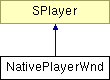
Class diagram for NativePlayerWnd:
Public Members | |||
 | | NativePlayerWnd () | |
| | ~NativePlayerWnd () | |
| | virtual BOOL | StartTimer ( int playTimerInterval, int cursorTimerInterval ) |
| | virtual void | StopTimer () |
| | virtual void | ClientRect ( SRECT* ) |
| | virtual BOOL | UpdateCursor () |
| | virtual void | InvalidateScreenArea ( SRECT* ) |
| | virtual void | AdjustWindow ( int width, int height ) |
| | virtual void | EnableMenus ( const MenuStatus& menuStatus ) |
| | U16* | GetStringFromClipboard () |
| | void | SetStringToClipboard ( const U16* text ) |
| | char* | GetStringFromClipboard () |
| | virtual void | StreamPostURLNotify ( const char* url, const char* window, U32 len, const char* buf, void* notifyData ) |
| | virtual void | StreamGetURLNotify ( const char* url, const char* window, void* notifyData ) |
| | virtual void | CloseStream ( StreamData* streamData ) |
| | virtual void | ProcessFSCommand ( char* command, char* args ) |
[virtual]
There are two timers:
1. PlayTimer, which fires every frame to redraw, and
2. CursorTimer, which causes the edit text cursor to blink.
How the timers work is left completely up to the implementation. When the PlayerTimer fires, it calls DoPlay( true ). When the CursorTimer fires, it calls BlinkCursor(). The time passed in to StartTimer is in milliseconds.
Reimplemented from SPlayer.
[virtual] [virtual]
Screen function to get the size of the client window (The client window is the drawing area for Flash) into SRECT. NOTE: the returned rectangle must be 0 based. (That is xmin == ymin == 0.)
Reimplemented from SPlayer.
[virtual]
Flash uses this call to request a cursor shape change. Update Cursor calls GetCursorType() to get the description of the current cursor type.
Reimplemented from SPlayer.
[virtual]
Requests an OS repaint message be sent for the SRECT passed in.
Why use the system message at all? The issue arises because we may not be doing regular updates (in the case of a paused or single frame movie) but if the image changes - for example the user zooms in on a particular spot - we need to repaint that single frame. If several events queue up we only want to repaint once so we go through the operating system event queue.
A valid resonse to this call is to call OnDraw, which could cause multiple redraws.
If using the OS repaint message, it is acceptabe to generate a message for the entire client window. This function can be called by the core code under the following circumstances:
- a new NativeBitmap gets created.
- camera or view change (from CheckUpdate)
- after a goto frame (from CheckUpdate)
The usage of this function by the core code is a bit quirky. It is not a function that a developer should rely on to be called in a regular way. The windows demo code has two versions of this function one which uses the OS event queue, and one which calls OnDraw.
Note this method may be deprectated in 1.1.
Reimplemented from SPlayer.
[virtual]
Screen function to set the size of the client window. (The client window is the drawing area for Flash.) If you have a fixed size window, meaning your client window can't or doesn't want to change size, this call should do nothing.
Reimplemented from SPlayer.
[virtual]
Flash makes this call and passes the state of the menus to the function through the menuStatus parameter. An application that uses menus can use this data to set them enabled, disabled, or checked. A call to SetMenuState will result in a call back to EnableMenus; use this to request the EnableMenus call.
Reimplemented from SPlayer.
Flash makes this call to gets a text string from the clipboard. May return NULL if there is none. If EDITTEXT_CLIPBOARD_WIDE is defined, then uses Unicode, else uses ascii. Note that in either format, Flash uses \n for a newline, and null to terminate the string. The native code should allocate the string and Flash core will delete it.
Flash makes this call to set a text string from the clipboard. If EDITTEXT_CLIPBOARD_WIDE is defined, then uses Unicode, else uses ascii. Note that in either format, Flash uses \n for a newline, and null to terminate the string.
Flash makes this call to gets a text string from the clipboard. May return NULL if there is none. If EDITTEXT_CLIPBOARD_WIDE is defined, then uses Unicode, else uses ascii. Note that in either format, Flash uses \n for a newline, and null to terminate the string. The native code should allocate the string and Flash core will delete it.
[virtual]
Streaming function. See the SPlayer::StreamPostURLNotify() reference for a full description. Note that the post is not supported, at this time, in the demo version.
Reimplemented from SPlayer.
[virtual]
Streaming function. See the SPlayer::StreamGetURLNotify() reference for a full description.
Reimplemented from SPlayer.
[virtual]
Streaming function. See the SPlayer::CloseStream() reference for a full description.
Reimplemented from SPlayer.
[virtual]
Streaming function -- in some cases. See the SPlayer::ProcessFSCommand() reference for a full description.
Reimplemented from SPlayer.